9. Template and playback modes
Default template location:
Packages/com.snippets.sdk/Editor/SnippetsTemplates/SnippetTemplate.prefab
The default Snippets template prefab is intended as a production-ready starting point, not a limitation.
You can use it as-is for fast integration, or customize it to match your project’s visual style, audio pipeline,
accessibility requirements, and avatar setup. In practice, teams commonly customize text presentation
(TMP styling/layout), audio source settings (mixers/spatialization), avatar visuals (replace the placeholder
avatar with a compatible rig), and playback behavior (custom text/audio/avatar player subclasses) while
keeping the root SnippetPlayer orchestration model intact.
Core components:
- Root SnippetPlayer
- TextPlayer
- AudioPlayer
- AvatarPlayer (SnippetAvatarAnimatorPlayer)
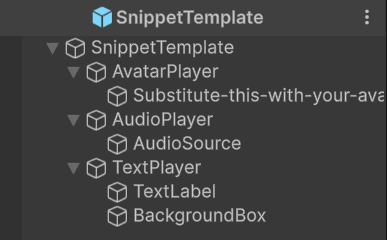
Snippets template default hierarchy
Text and subtitle modes: The default SnippetTmpTextPlayer supports FullText, HighlightAsSpoken, BuildUpText, RollingSubtitles, ScreenSubtitles, TwoLineSubtitles, and Typewriter modes, with continuous or sentence-based playback and optional screen-space subtitle output.
← Previous: Setting Up A Scene With Helper Tools
Next: Helper Tools →